
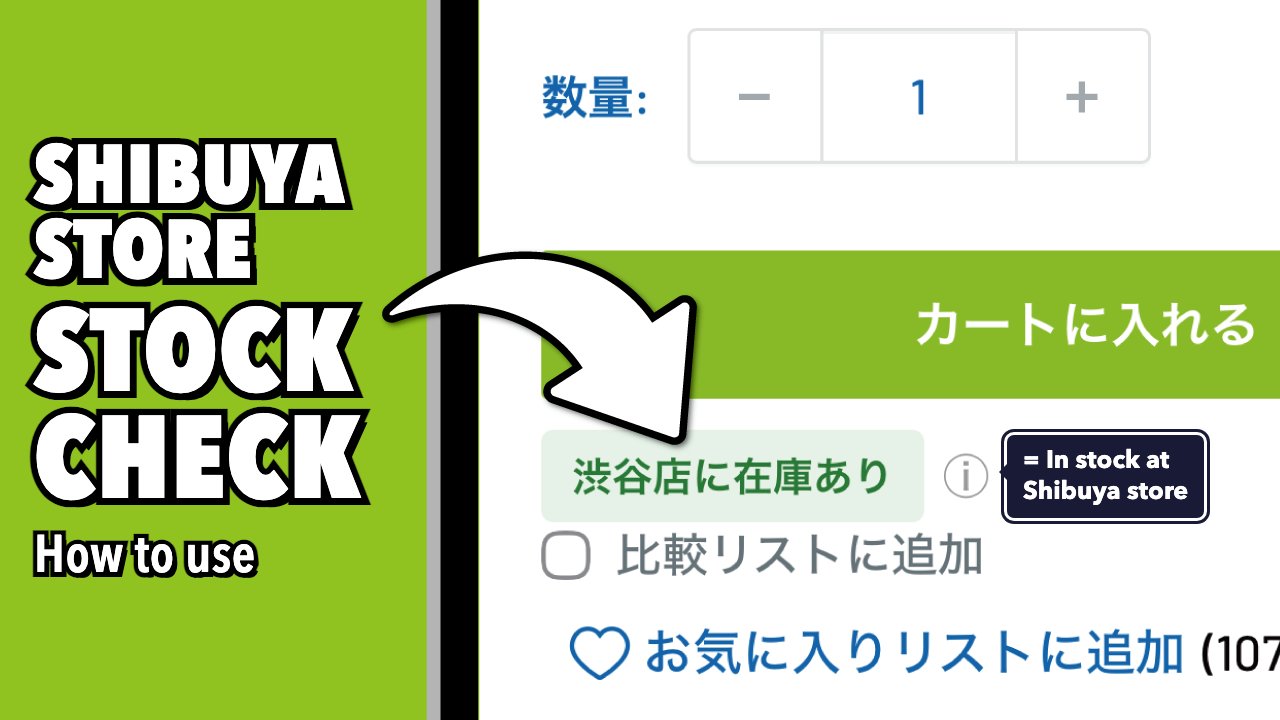
Our Japanese online store shows the in-store stock of REWIND Shibuya on each product page. Use it to check before you visit.
How to check in-store stock
- Open the product page
Find the item on our Japanese online store and open its product page. - Check the Shibuya store status
Look at the Shibuya store stock status shown near the cart button.
- Please also read “Before you use it” below.
TOC
How to read the stock status
The stock status is shown in Japanese.
| Shown on the page | Meaning |
|---|---|
| 在庫あり | In stock |
| 在庫なし | Out of stock |
| 在庫あり(発売前) | In stock, but not released yet |
Before you use it
Please note the following when you check in-store stock.
- Differences from actual stock
The stock in our system may differ from the actual stock in the store. Even if an item shows 「在庫あり」, we may not have it. - Update timing
Stock information is updated almost in real time, but there may be a short delay. - Items waiting for checkout
Stock is updated at checkout. An item may show 「在庫あり」 even when it’s no longer on the shelf, for example while another customer is holding it and waiting to pay. - Event sales
Before and after events, items for event sales may temporarily show 「在庫あり」. This doesn’t mean they are on sale now. - Upcoming arrivals
Items scheduled to arrive show 「在庫なし」 until they are shipped to the Shibuya store. - Items before release
Even if an item shows 「在庫あり(発売前)」, we may not be able to provide it at the release time because of excess reservations or defective items. - Online orders, holds, and transfers
As a rule, we don’t accept online orders for the Shibuya store’s stock, and we can’t hold or transfer items.
About REWIND Shibuya
REWIND Shibuya is a yo-yo specialty store in Jinnan, Shibuya, Tokyo, run by world champions. Check our hours, closed days, and access before your visit.